Blog / Guide
Write to UsCan You Have Multiple Instagram Accounts? The Complete 2026 Guide
January 29, 2025
Guide
Instagram has evolved far beyond a platform for sharing photos. It's now a core channel for personal brands, agencies, eCommerce businesses, and creators to connect with audiences worldwide. If you've been wondering, "Can you have multiple Instagram accounts?", the answer is yes — and if managed properly, it can unlock new opportunities for growth.
But here's the challenge: juggling multiple accounts can be risky. Without the right setup, accounts can get linked or even banned. Whether you're handling personal and professional profiles or running dozens of business accounts, you need a safe, efficient approach.
Quick Tip: If you're ready to scale Instagram operations the smart way, combining LightningProxies for high-quality, reliable IPs with AdsPower for secure multi-account management gives you both safety and speed.
Can You Have Multiple Instagram Accounts?
Yes — Instagram allows multiple accounts.
In fact, the platform makes it easy to add and switch between accounts from the same app. This works well if you:
- Want to separate personal and professional profiles
- Run a side business or manage a brand alongside your main account
- Handle accounts for clients as a freelancer or agency
- Explore different niches or regions as a creator
However, Instagram's built-in features were never designed for large-scale account management. They:
- Support only up to five accounts in one app session
- Link accounts through shared device data and IPs
- Flag suspicious login behavior, which can lead to reviews or bans
So while the answer to "Instagram — can you have multiple accounts?" is yes, scaling that safely requires the right tools and strategies.
Can You Have Multiple Instagram Accounts on One Email?
Generally, Instagram requires one email or phone number per account. Attempting to create multiple accounts on the same email can cause:
- Confusing password resets
- Security vulnerabilities — one breach could affect all accounts
- Higher risk of Instagram connecting related accounts
Best practices:
- Use unique emails (and ideally separate phone numbers) for each account
- Store credentials securely in a password manager
- Separate business-critical accounts from personal ones
At scale, creating and maintaining dozens of accounts manually becomes a challenge. This is where solutions like AdsPower and LightningProxies help. AdsPower creates isolated browser environments, while LightningProxies provides unique, trusted IP addresses — together, they make it possible to run multiple Instagram accounts without risky overlaps.
How to Manage Multiple Instagram Accounts in the App
If you just need a few accounts (up to five), Instagram's own app can handle it:
- Open Instagram and go to your profile.
- Tap the menu (☰) > Settings and privacy.
- Scroll down and select Add account.
- Choose to log into an existing account or create a new one.
- Once added, switch between accounts by tapping your username at the top of your profile.
Limitations of this method:
- Hard cap: Only five accounts per app
- Shared environment: All accounts technically share the same device and IP
- Manual switching: Inefficient for high-volume or team workflows
- Risk of linkage: If one account is flagged, others could be reviewed
That's fine for casual users — but businesses, agencies, or anyone scaling beyond a handful of accounts need a safer, smarter approach.
Scaling Safely: The LightningProxies + AdsPower Approach
When Instagram detects logins from the same IP, device, or overlapping patterns, accounts can get flagged — sometimes even suspended. If those accounts represent clients, brands, or revenue streams, the consequences are serious.
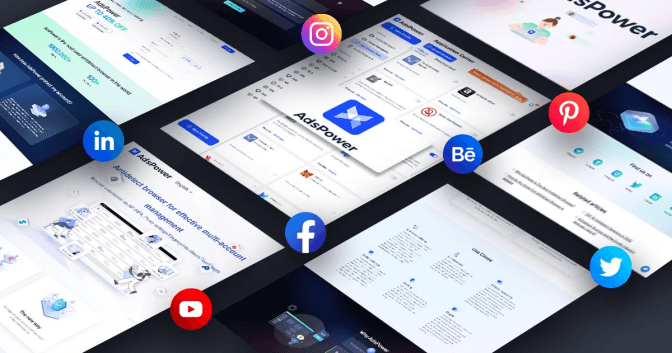
This is where combining LightningProxies with AdsPower provides a professional-grade solution:
- AdsPower creates unique, isolated browser profiles — each one acting as a separate device.
- LightningProxies provides reliable, high-speed residential and datacenter proxies — ensuring each account logs in from a clean, trusted IP.
- Together, they eliminate cross-contamination: accounts stay separate, safe, and compliant.
Steps to Set Up Instagram Profiles in AdsPower:
1. Define Your Ideal Location:
Determine the platform you want to own multi accounts (e.g., "US-based Instagram Account A") and the required geographic location (e.g., "Residential IP in Dallas, Texas").
2. Source Your Residential Proxy (LightningProxies):
Open LightningProxies.net, choose a plan (daily, weekly, or monthly), and select the geography that matches your new identity. After checkout, download the proxy list as "username:password@endpoint:port."
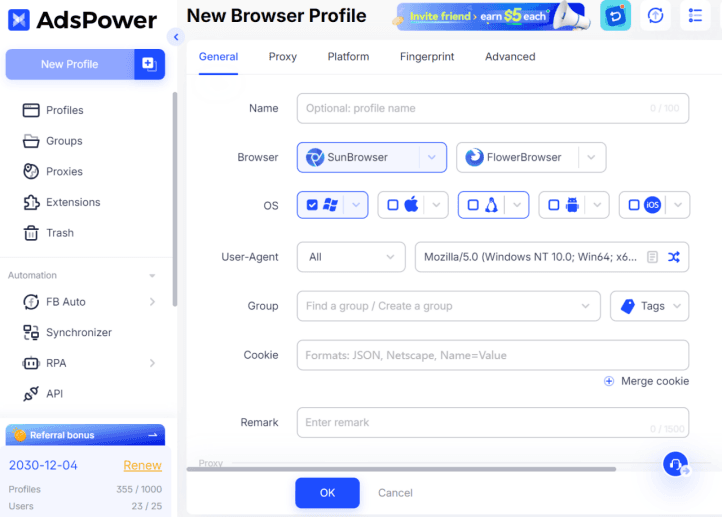
3. Create Your New Browser Profile (AdsPower):
Click "New Profile (one profile for once)" or "Bulk Create."
- Give it a clear name (e.g., "Instagram 01 - Dalla ResIP").
- Fingerprint Configuration: You can often customize specific elements if needed (e.g., OS, Browser Type - Chrome, Firefox). For most users, the default strong fingerprint is sufficient.
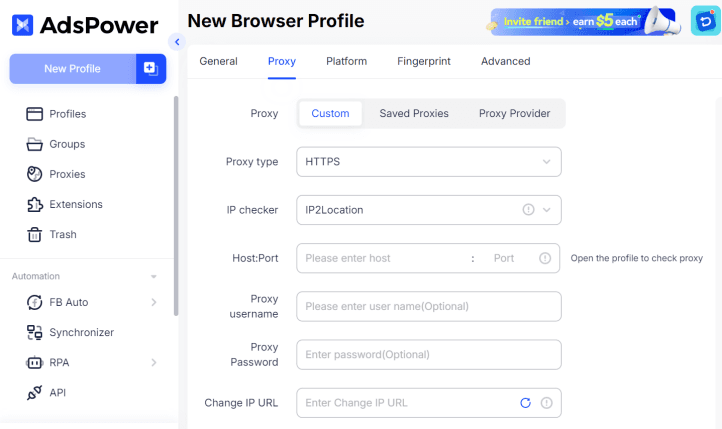
4. Integrate LightningProxies Residential Proxy:
- Within the profile creation/editing window in AdsPower, find the "Proxy" settings section.
- Click "Custom", then choose your "Proxy Type."
- Convert this message (username:password@endpoint:port.) you got from LightningProxies. Enter [Host: Post].
- AdsPower usually offers an "Open the profile to check proxy" button. Use this to verify the connection.
5. Finalize & Launch:
- Click OK to save the above settings.
- Launch the created profile.
Real-world examples:
- Social media agencies running campaigns for multiple brands simultaneously
- Influencers testing content strategies across regions or niches
- E-commerce sellers operating multiple storefronts in different markets without triggering platform suspicion
If you're looking to scale safely, pair LightningProxies for IP diversity with AdsPower for account isolation — a proven combination for professional Instagram growth.
Best Practices for Running Multiple Instagram Accounts
To protect your work and reputation, follow these best practices:
- Use unique login credentials for every account
- Separate personal and business profiles
- Maintain distinct content strategies — avoid repetitive posting
- Comply with Instagram's community standards and avoid spammy automation
- Regularly review account health — logins, suspicious alerts, engagement rates
- Keep access secure, especially when working with teams or clients
- Rely on professional infrastructure — LightningProxies + AdsPower — for large-scale operations
FAQs
Can you have multiple accounts on Instagram without getting banned?
Can I run Instagram accounts for clients without sharing passwords?
Can I use the same phone number for multiple Instagram accounts?
What's the safest way to handle logins across multiple devices?
Conclusion: Multiple Accounts Done Right
So, can you have multiple accounts on Instagram? Definitely — and for many professionals, it's a necessity. But doing it safely is what keeps accounts alive and growth sustainable.
For casual users, Instagram's built-in tools may be enough. But for serious marketers, agencies, or eCommerce operators, combining AdsPower for secure browser isolation with LightningProxies for reliable, diverse IPs provides the safest, most efficient setup.
Ready to scale your Instagram presence? Protect your accounts, save time, and grow with confidence — start using LightningProxies and AdsPower antidetect browser today.

October 22, 2025
Comparison
Proxy vs VPN: What's the Difference & Which One Should You Use?
Learn the key differences between proxies and VPNs, including speed, security, and use cases. Discover why proxies are often better for business operations.
September 29, 2025
Guide
What Is a Residential Proxy: Complete Guide 2025
Learn everything about residential proxies: how they work, types, benefits, and use cases for web scraping and privacy.
October 03, 2025
Announcements
Proxy Meaning: What Does a Proxy Really Do
Discover the true meaning of proxy servers and how they work.